
WordPress Bulma NavWalker With Font Awesome Support
Earlier this year I revamped my WordPress website using Bulma, a CSS Flexbox Framework. I tested a few Navwalkers to integrate the WordPress Nav Menus into the Bulma Navigation. Although they worked they didn’t support Font Awesome. I embarked on creating my own Bulma Navwalker with inspiration from my previous Bootstrap Navwalker and GiottoPress.
Features
Prior to using Bulma my original custom bootstrap theme included font awesome by adding the relevant code to the title input box in WordPress Menus. In this Bulma Navwalker, the Font Awesome Classes are added to the CSS Classes input box. Bulma Navwalker also works with font Awesome 5 and you can choose whether to show/hide the anchor titles.
Download Bulma Navwalker
Download Bulma Navwalker Drop the file into your WordPress theme folder and hook up to it in your functions.php.
require_once('classes/bulma-navwalker.php');Whilst in functions.php declare a new menu unless it otherwise exists.
register_nav_menus( array(
    'header-menu' => __( 'Header Menu', 'THEMENAME' ),
) );
Setup the Bulma NavBar and wp_nav_menu in header.php. This demo example uses is-fixed-top and navbar-end from the Bulma CSS Framework. Please consult the documentation for other options Bulma Components – NavBar.
<nav class="navbar is-fixed-top" aria-label="main navigation">
  <div class="navbar-brand">
    <a class="navbar-item" href="<?php echo esc_url( home_url( '/' ) );?>">
      <img alt="My Logo"
           src="<?php echo get_template_directory_uri();?>/images/my-logo.png">
    </a>
    <button class="button navbar-burger is-active" data-target="primary-menu"
            aria-controls="primary-menu" aria-haspopup="true"
            aria-label="Menu Button" aria-pressed="false">
      <span aria-hidden="true"></span>
      <span aria-hidden="true"></span>
      <span aria-hidden="true"></span>
    </button>
  </div>
  <div id="primary-menu" class="navbar-menu is-active">
    <div class="navbar-end">
      <?php wp_nav_menu(array(
             'theme-location'   => 'header-menu',
             'depth'        =>  3,
             'menu'         =>  'NewNav',
             'container'        =>  '',
             'menu_class'       =>  '',
             'items_wrap'       =>  '%3$s',
             'walker'       =>  new Bulma_NavWalker(),
             'fallback_cb'      =>  'Bulma_NavWalker::fallback'
         ));
         ?>
    </div>
  </div>
</nav>
Configuration
Font Awesome
It has been tested using version 5 but should work on earlier versions. To add Font Awesome Icons you need to Enqueue the JavasScript in functions.php.
function wow_scripts() {
    //include other scripts and styles too
    wp_enqueue_script('font-awesome','//use.fontawesome.com/releases/v5.0.13/js/all.js',
                       null,
                       null,
                       true);
}

add_action( 'wp_enqueue_scripts', 'wow_scripts' );
Displaying Font Awesome Icons
Tested on top-level navigation links! Find the icon code snippet from Font Awesome Gallery Add the snippet into the CSS Class input box in Appearance->Menus in the WordPress Admin. For example, to add a home icon to the Home link add fas fa-home to the CSS Class input box.
Displaying The Title
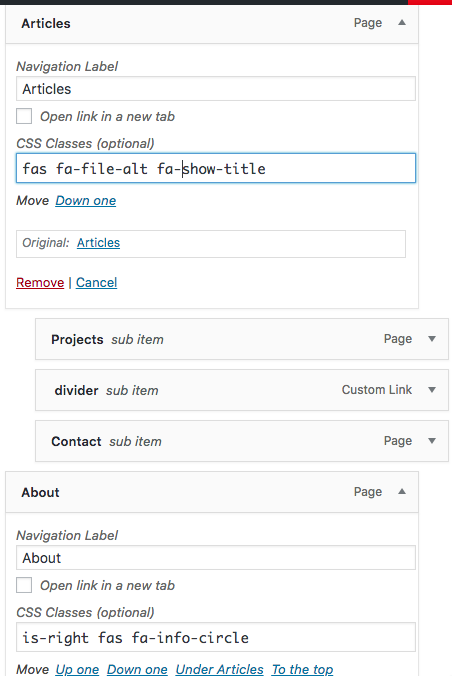
Add the class fa-show-title to the CSS class input box Leave it blank if you only want to display the icon. Bulma NavWalker Font Awesome Show Title
NavBar Divider
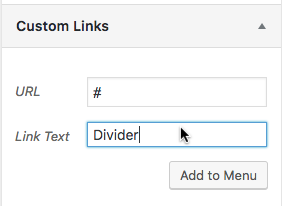
Tested on dropdowns Add a custom link using # in the URL box Add the class navbar-divider to the CSS class input box.
Alignment Class
The class is-right is used on the farthest dropdown when using the navbar-end class. It simply aligns the dropdown so that it doesn’t overflow the page. Simply add is-right to the parent element.
Future Features and Bugfixes
Although I have thoroughly tested the NavWalker if you come across any errors or bugs please report any issues.